
Give your AI agents long-term operational memory
The longer you work with AI, the more it matters that last time’s decisions, each customer’s circumstances, and lessons learned from failure carry over to the next job. Nihonbashi AI Lab designs and operates this working experience as long-term operational memory that AI agents can reference.
- Decisions, customer context, and lessons carry over to the next task
- Accumulated as organizational memory, not personal notes
- AI keeps the same context even when the person in charge changes
From individuals to the organization
From one person’s memory to the organization’s
Feeding AI someone’s personal notes and chat logs makes that one person faster. But what an organization needs is memory that lets AI carry the same context regardless of who is in charge. Nihonbashi AI Lab does not add more note-taking — we design a system where experience is captured in the flow of work and AI can use it for the next decision.
Even with AI in use, the judgment and experience gained evaporate on the spot, never reaching the next job.
operational memory
Team decisions, customer context, and lessons learned — carried by AI in the same context, whoever takes over.
Individuals
Reference your own notes and case history to recall the assumptions behind your work.
Teams
Share and pass on customer interactions, proposals, checkpoints, and judgment calls on exceptions.
Organizations
Turn judgment and failure once locked in individuals into knowledge assets that keep working.
From search to memory
Treat what you give AI as distinct kinds of memory
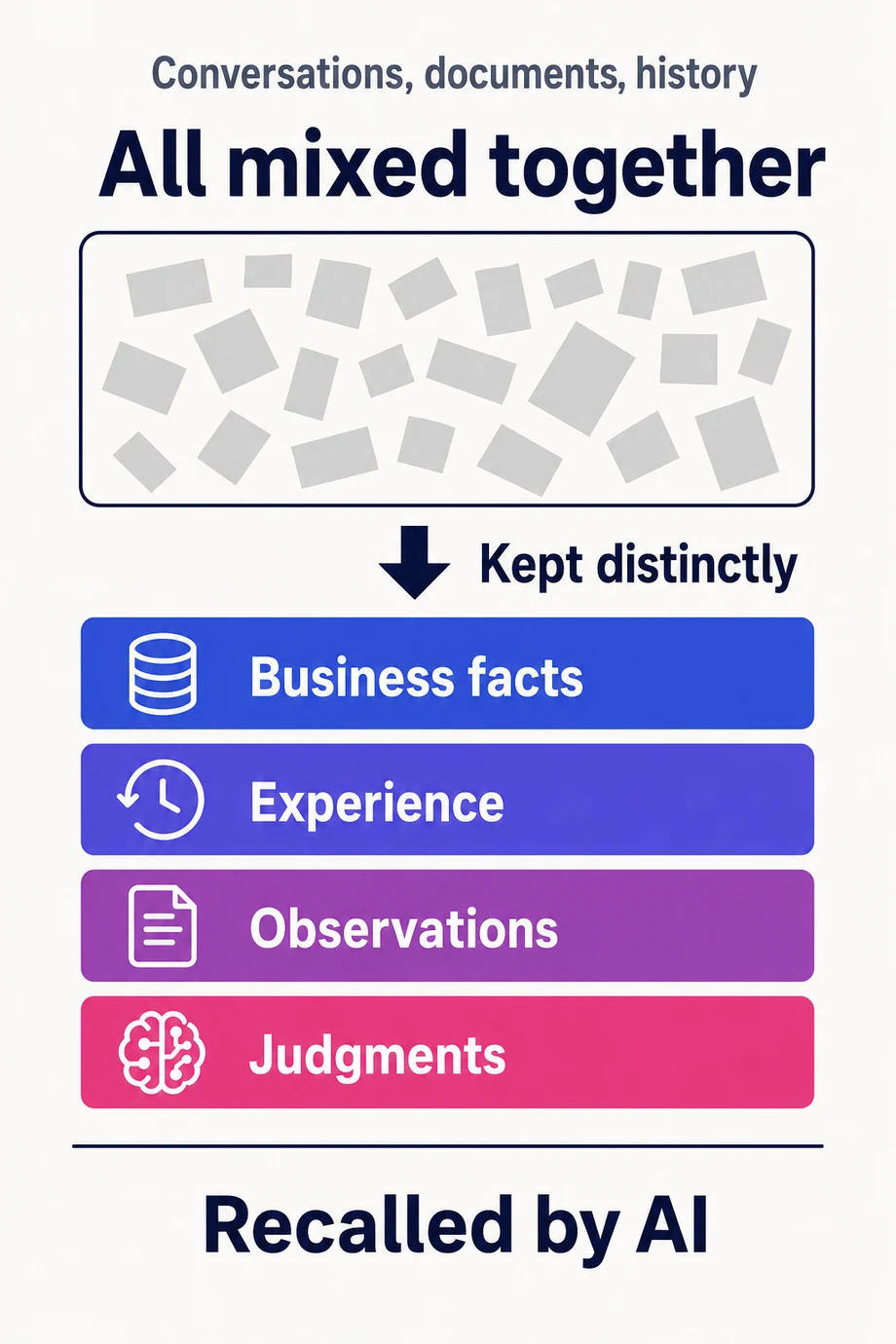
Simply letting AI read old documents and conversations does not create operational memory. Facts, experience, observations about customers and deals, and judgments each need to be kept distinctly and recalled at the right moment. Using Hindsight, Nihonbashi AI Lab designs memory infrastructure that lets AI agents carry business context over time.
Episodic memory
What happened
Events in sequence: actions, results, and the history of interactions.
Semantic memory
What is true
Structured facts: settings, contracts, current state.
Procedural memory
How to do it
Learned procedures and strategies — the approaches that worked.
The three types above are the standard framing. Each type wants a different way of storing and retrieving; mix them together and retrieval noise grows until AI can no longer recall correctly. Nihonbashi AI Lab adapts this to the realities of business work in four forms.
Business facts
Customer details, contract terms, dates, stakeholders, deal status — the objective information every decision rests on.
Experience
How you pitched it last time, what was tried, where it got stuck. Past responses preserved as experience for the next job.
Observations
Neutral summaries of customers, deals, and other subjects of your business, distilled from multiple facts and histories.
Judgments
When to proceed, and why a given response was chosen — kept as judgments with their rationale and confidence.
Memory in motion
Retention, recall, reflection — picking up where you left off
With Hindsight, working experience is not just stored — it is retained, recalled, and applied to the next decision. Memory banks stay separated, change is monitored, and AI agents always have the context they need.
Design which memories to separate and which to share, per department, workflow, customer, or AI agent.
Extract reusable facts, relationships, and reasons from conversations, case history, and decision notes.
Before AI answers or acts, it retrieves past decisions, customer context, and relevant lessons from failure.
Design the reasoning frame AI uses to decide how to approach the task at hand, drawing on memory as raw material.
Detect recurring patterns and contradictions, treating knowledge as evolving experience rather than fixed truth.
Design and operations
What we design is not the memory itself, but how it runs
Installing memory infrastructure alone does not grow operational memory. What to remember, what to discard, when to recall, and where humans must verify — that design and operation is the core of AI operational memory management.
Separate norms from experience
Manuals and rules are managed as norms; the judgments, failures, and context that accumulate in practice are treated as an experience layer.
Decide what to remember
What to keep, what to discard, and at what granularity to split memory banks — designed per workflow.
Control sensitive information
Personal data, credentials, and customer secrets: decide upfront what AI must never retain.
Design how AI judges
Set rigor, skepticism, conditions to verify, and evidence to cite, so AI does not jump to confident conclusions.
Connect to business apps
Make memory available not just in chat but from CRM, project tracking, support desks, and internal tools.
Grow memory through operations
Review stale memories, wrong memories, and reusable patterns, keeping knowledge current and actually used.
What changes
What changes after adoption
The goal is not an AI that knows more trivia. It is a state where people and AI look at the same evidence and continue the work from where it last stopped.
Less time re-explaining the same context to AI
Customer and deal context survives staff changes
Past failures become checkpoints for next time
New hires and partners can reference how the organization decides
AI agents start their next task with grounded context
Tacit knowledge becomes a living business asset, updated daily
How adoption works
Start small, then run it as operational memory
Memory audit
Map where decisions and context are being lost, and separate what AI should remember from what it must not.
Memory infrastructure design
Design memory banks, retention policy, recall conditions, reasoning posture, and confidentiality rules around your workflows.
Start small
Begin with one team or one workflow, and validate the experience of AI picking up where it left off.
Memory management
Ongoing support for memory quality, updates, deletion, and promotion into organizational knowledge.
Start with one workflow
Pick one workflow, and let AI start using memory
Customer support, quoting, proposals, engineering, inquiries, project tracking. Choose one workflow where memory keeps getting lost, and give AI agents access to last time’s decisions and context.