
You built the app with AI — a restaurant map for shipping and running it
With Claude Code or Codex, you can now get a web app working end to end. Then someone says "deploy it," or "set the environment variables," and you freeze. Server, database, hosting, deploy — this piece maps those scattered terms onto one restaurant, front door to back. By the end you have one map for putting an app live and keeping it running.

AI builds the screen, then the words change
In AI-driven development, the screen comes together quickly. But once the app is built and the talk turns to shipping and running it, unfamiliar words start piling up. Some of these moments may feel familiar:
- The AI replies, "let's deploy it," and you're not sure what deploy actually means
- The screen says "set the environment variables," and you don't know what goes where
- It works in your local preview, but breaks in production
- Data you typed into a form is gone the next time you open the page
None of these are problems with how you write code. They are about the ground a web app stands on — where the thing you built actually runs, and how it keeps running. Let's walk that ground as a single restaurant, from the front door to the back.
A web app fits on two axes
Before the individual terms, one map. Break a web app down far enough and it comes down to two axes.
The first is the round trip of request and response. A guest places an order; a dish comes back. The browser — the screen the person uses — asks, "give me this page," and an answer returns. Strip a web app to its core and it is this round trip, over and over.
The second is where state — the data — lives. Of the information created along the way, some vanishes on the spot, and some is put away so it is still there next time.
Every term that follows can be placed with two questions: where is it in the round trip, and does it hold the data. Keep that in view and you won't get lost. Now let's walk through one restaurant.
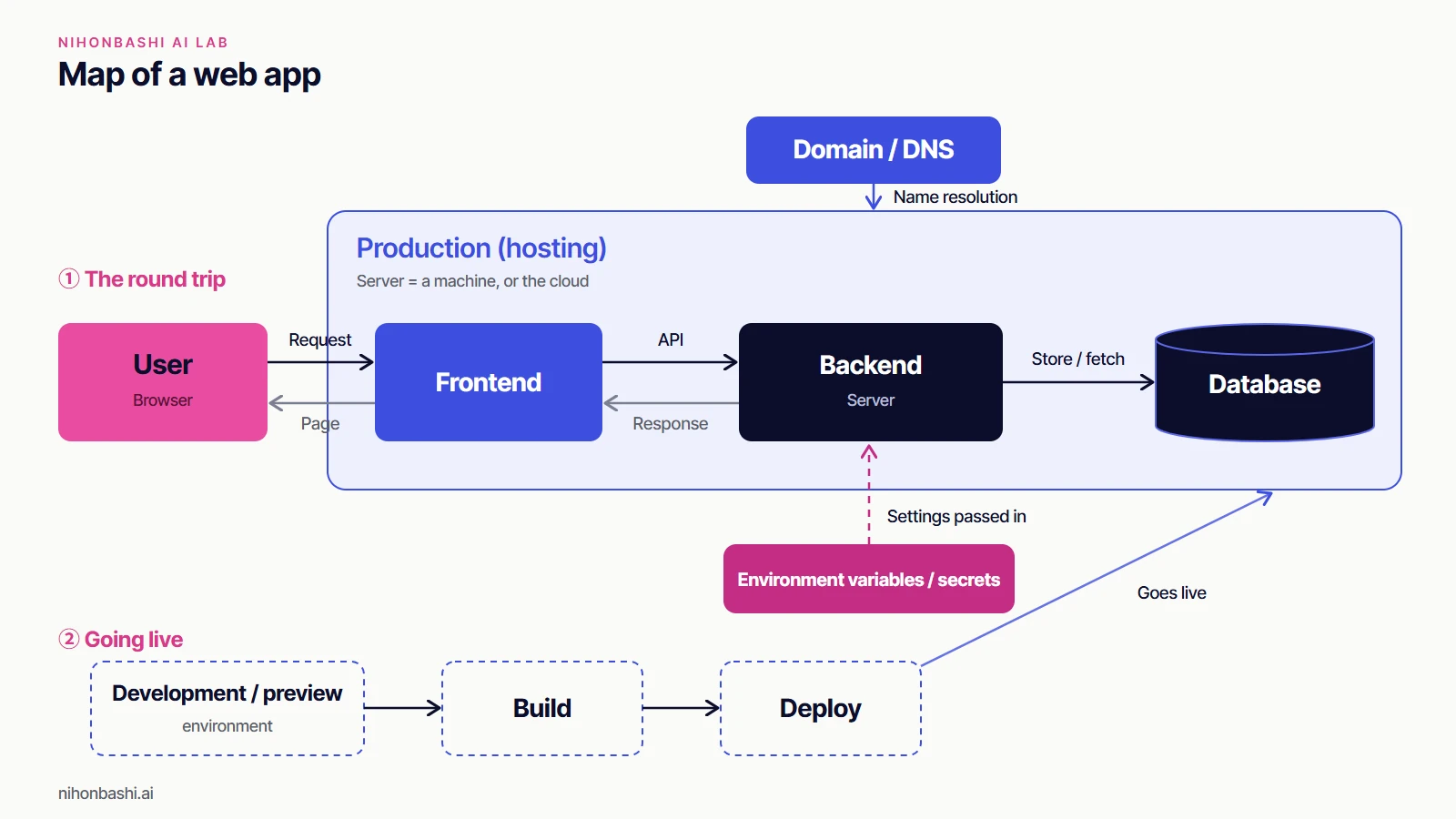
From order to plate
- The guest who walks in is the browser. This is the side that places the order.
- The dining room the guest sees — the space, the menu, the service — is the frontend. It carries the look and the interaction.
- The kitchen that takes the order, cooks, and decides how it tastes is the backend. It is the program that calculates and decides behind the screen.
- The order ticket that moves between dining room and kitchen is the API. It sets what you hand over and what comes back, and the same kind of ticket handles dealings with outside suppliers.
That is the cast of the round trip. So where does the data stay? The pantry and fridge that hold ingredients and prepared stock are the database (DB). Registration details, a saved note — put them here and you can take them out again next time. Ingredients left out on the counter instead of stored away get cleared when the restaurant closes.
"The data I entered is gone when I reopen" usually comes down to this. It never went through the step that saves to the DB; it was only set down on the spot, so it isn't there for the next service.
Server is one word for two things
The word that trips people up most is server. This single word points to different things depending on context.
One is the kitchen we just met — the running program itself. That is the sense in "handle it on the server." The other is the place where that program runs — the premises the kitchen sits in: a machine, or the cloud. That is the sense in "rent a server" or "put it on a server."
When the AI says "stand up a server," which one it means comes from the surrounding words. If the talk is about processing, it is the kitchen; if it is about where things sit, it is the premises. Just knowing that one word covers both cuts down on misreadings.
Renting those premises and setting up shop is hosting. You can build your own, but most people rent space in the cloud. Some arrangements set out tables only when you need them, and the landlord takes on much of the upkeep.
Even with the premises settled, guests can't arrive without an address. An address like nihonbashi.ai is the domain; the system that points that address to the actual premises is DNS. Buying a domain doesn't open the shop. Only when the address is tied to the premises can people find their way in.
Built and still running are not the same
Working on your machine or in preview is one thing; being live in production, where people keep using it, is another. Here the difference between prep and opening starts to matter.
Taking the code you wrote and assembling it into the form that actually runs in production is the build — the prep work. Putting that result out on the counter, ready to serve, is the deploy. Finishing the prep feeds no one yet. It reaches people only once you open. "The build passed, but it isn't live" is the confusion that comes from treating prep and opening as one continuous step.
Apart from the working floor, there is also a test kitchen. The place to try a new dish before serving it to guests is the development environment, or preview; the one people actually use is production. Trying things in the test kitchen before sending them to the floor is what prevents accidents.
And every restaurant has a safe with a key it must never hand out. Values like the passphrase for dealing with an outside service — an API key — are passed in as environment variables. Environment variables, broadly, are the container for the settings you hand the shop at run time; the part of that container that must never leave is the secret. That secret is the key. If the key isn't in the production safe, the app can't open the door to the outside service — it worked in preview, but only production stalls. "Set the environment variables" means: put the keys in this safe.
Two more, if you have room
Once the restaurant is running, two more mechanisms help. Delivering images and the like quickly from a pickup point placed near the guest is the CDN. Making the flow from prep to opening run on its own whenever you update is CI/CD. You can open the doors without either. Hold the two axes first — the round trip and the data — and add these when you need them.
Representative services, term by term
Words click into place once you can attach real things to them. Here are commonly used services, one per box on the map (each is just an example):
- Frontend … React, Vue, Next.js (Next.js also runs backend code, so it can straddle both boxes)
- Backend (server) … Node.js, Python, Supabase Edge Functions
- Database … PostgreSQL, MySQL, Supabase, Firebase
- Hosting … Vercel, Netlify, Cloudflare, Lovable Cloud
- Domain / DNS … Cloudflare, Namecheap, GoDaddy — in Japan, onamae.com or Value Domain
- Build … Vite, webpack
- Deploy … Vercel, Netlify, GitHub Actions
- Environment variables / secrets … the .env file, Vercel environment variables, Supabase Secrets
One thing worth knowing: recent services often cover several roles at once. Vercel handles hosting, deploy, and build together; Supabase takes on both the database and the backend. Some services, like Lovable, cover the whole span from database to hosting and deploy. That is why a single service name can seem to straddle several boxes on the map.
AI can build the screen, but the map stays with people
Put back on the first map, every term settles into place. On the round-trip side: the browser, the frontend, the API, the backend. Holding the data: the database. Where it runs and how people reach it: hosting, the domain, and DNS. The steps to go live: build and deploy. And the secret settings: environment variables. With this map, you can direct the AI, and sort out what is wrong when things stall, in your own words.
One honest note, though. AI builds screens remarkably fast, but it will not design the restaurant for you. Which data to keep and where, who may see what, where to hand work to AI and where a person checks it, how to keep the place running after it opens — those are for people to decide.
What we care about at Nihonbashi AI Lab is not building the screen itself, but the four kinds of design that sit before and behind it:
- Business design: which part of which workflow that screen actually carries
- Data and permission design: what to keep in the pantry, and who may take it out
- AI-adoption design: where to hand work to AI, and where a person checks it
- Operational flow: after opening, who keeps the restaurant running, and how
Building with AI, but not sure how to draw this map? Talk to Nihonbashi AI Lab. Let's design what comes after "it's built" — keeping it running — together.
Let’s talk about how AI could fit your own operations
Contact us